
 Tiếng Việt
 )
)PhotoRoom MOD APK is a powerful AI photo editor for users who want to remove backgrounds, create product images, and prepare professional-looking visuals directly on Android. With Pro features, advanced AI tools, watermark-free exports, and fewer interruptions, the modified version available through APKMODY offers a more flexible editing experience for creators, online sellers, and everyday users.
What Is PhotoRoom MOD APK?
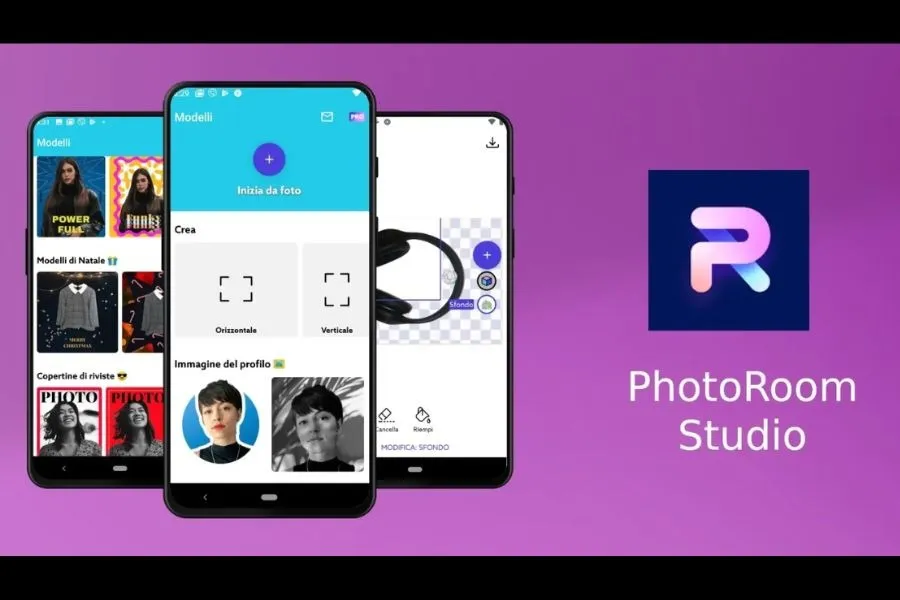
PhotoRoom is an AI-powered photo editing app designed to make complex image editing easier. It can automatically identify the main subject of a photo, remove the original background, and replace it with a clean color, template, or AI-generated scene.
The app is especially useful for product photography. Online sellers can create cleaner product listings, add realistic backgrounds, resize images, apply shadows, and prepare visuals for marketplaces or social media without using desktop editing software.
PhotoRoom also includes templates, text, graphics, layers, batch editing, and AI-powered tools for creating or modifying images. These features make it suitable for both quick edits and larger content workflows.

PhotoRoom MOD APK provides easier access to supported premium functions. Depending on the build, users may gain Pro tools, additional AI features, watermark-free exports, and an experience with fewer advertising interruptions.
PhotoRoom MOD APK Features for Easier Editing
The modified version focuses on reducing restrictions around PhotoRoom’s advanced editing tools. This can make it easier to create clean product images, marketing visuals, profile photos, and social content directly from a phone.
Pro Unlocked
Pro Unlocked provides access to supported premium tools and resources that may otherwise require a paid subscription.
These can include advanced background editing, templates, higher-level customization options, batch functions, and other professional tools.
For users who regularly create product photos or promotional content, having more editing options available can reduce the time spent switching between different apps.
The exact Pro features available depend on the specific MOD build.
AI Tools Unlocked
AI is one of PhotoRoom’s main strengths. The app can automate tasks that normally require careful manual editing.
Supported AI functions may include background generation, product staging, object editing, recoloring, AI shadows, virtual models, and prompt-based image changes.
For example, a simple product image can be placed into a more realistic scene without photographing the item again. Users can also adjust backgrounds or visual details while keeping the main product as the focus.
Some AI functions rely on online processing or credits, so not every server-based tool can necessarily be fully unlocked by a modified APK.
No Watermark
The No Watermark feature allows supported images to be exported without additional PhotoRoom branding.
This is especially useful for online stores, marketplace listings, social media posts, and promotional graphics where a clean final image looks more professional.
Users can prepare an image, remove or replace the background, add design elements, and save the finished result without needing another app to clean up the export.
No Ads
The No Ads feature reduces supported advertising interruptions while editing.
This creates a smoother workflow when switching between photos, testing backgrounds, applying AI tools, or preparing several product images in one session.
A cleaner interface can also make the app easier to use for people who frequently edit content on mobile devices.
PhotoRoom APK vs MOD Version
The original PhotoRoom APK and modified version share the same basic editing environment, but access to premium resources can differ.
| Feature | Original APK | MOD Version |
|---|---|---|
| Background Removal | Yes | Yes |
| Basic Editing | Yes | Yes |
| Pro Features | Subscription Required | Unlocked if Supported |
| AI Tools | Plan / Credit Dependent | Additional Access if Supported |
| Premium Templates | Limited | Unlocked |
| Watermark | May Apply | Removed |
| Batch Editing | Plan Dependent | Available if Supported |
| Ads / Promotions | May Appear | Reduced / Removed |
The standard version is suitable for basic edits and users who prefer official subscription access. The MOD version is aimed at users who want fewer restrictions around premium editing tools and exports.
However, PhotoRoom uses online processing for several AI functions. Features that depend on accounts, subscriptions, servers, or AI credits may still behave differently from locally unlocked tools.

Conclusion
PhotoRoom MOD APK provides a convenient way to create polished images with background removal, AI editing, product-focused tools, and premium resources. Features such as Pro Unlocked, AI Tools, No Watermark, and No Ads can make the editing process more flexible for creators and online sellers.
If you regularly work with images, explore more apps in the Photography & Editing collection. You can also try PicsArt MOD APK for creative photo editing, Lightroom MOD APK for detailed color adjustments, or Remini MOD APK for AI-powered photo enhancement.
Does PhotoRoom MOD unlock Pro features?
Supported MOD builds may unlock premium editing functions, templates, background tools, and other Pro resources. The available features can differ between versions.
Can I remove backgrounds without a watermark?
Yes, supported builds with the No Watermark feature can export compatible edits without PhotoRoom branding on the final image.
Are AI tools available in the MOD version?
Some AI features may be available, including supported background generation, object editing, AI shadows, and other automated tools. Features that depend on PhotoRoom's servers or AI credits may still have separate limitations.